 EN
 AR

Arabic website design rtl best practices go far beyond switching the text direction. Arabic readers move through a page from right to left, scan headings differently, and notice quickly when a layout was built for English and flipped at the last minute. In Saudi Arabia, where most visitors browse in Arabic on their phones, a natural Arabic layout is often the difference between a visitor who books and one who leaves.
This guide explains how to plan and build Arabic pages that feel right. It covers layout mirroring, typography, icons, numbers and dates, forms, mixed Arabic and English content, performance and testing. It is written for business owners, marketers and web teams building sites for clinics, shops, real estate firms and service companies in Saudi Arabia and Egypt.
Key takeaway
Mirror the whole layout, not only the text, and decide which elements should not flip.
Key takeaway
Choose Arabic fonts that read well on small screens and load quickly.
Key takeaway
Handle numbers, phone fields, prices and dates carefully, because they mix directions.
Key takeaway
Write Arabic content fresh rather than translating it word for word.
Key takeaway
Test every key page on real phones in Arabic before launch.
What arabic website design rtl best practices really cover
Right to left design is a full set of decisions. It touches navigation, reading order, alignment, icons, forms, tables, sliders, animation and even the order of buttons. When these decisions are made early, the Arabic site feels native. When they are left to the end, problems appear in dozens of small places.
Plan Arabic from the start
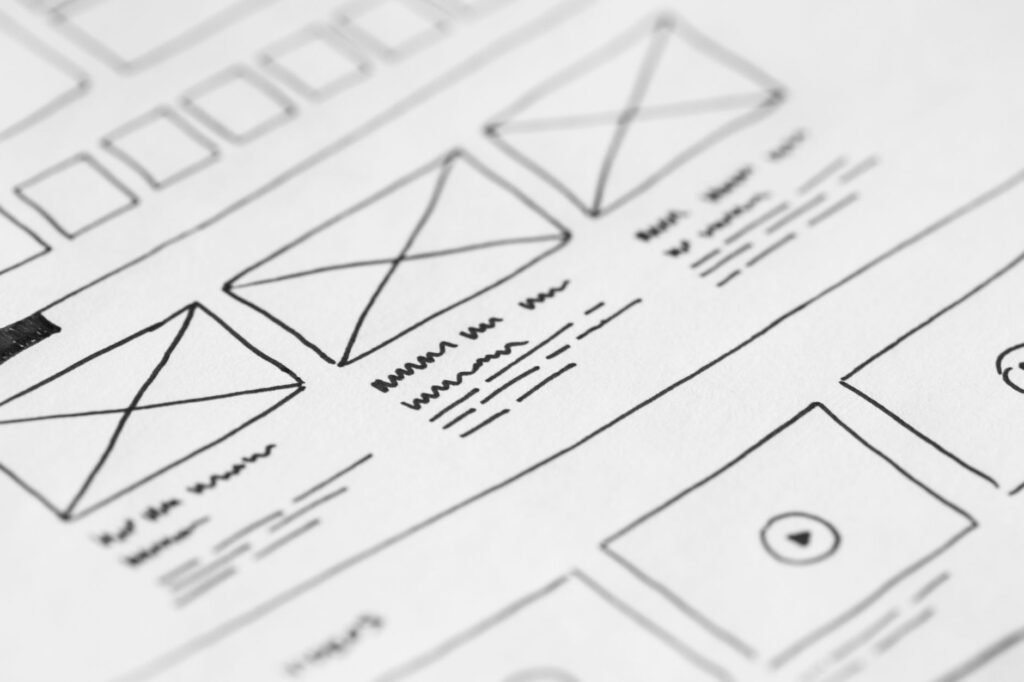
Design the Arabic version alongside the English one, not after it. Sketch key pages in both directions, agree how menus, cards and forms will behave, and give designers and developers the Arabic content early. This saves time and avoids layouts that only work in one language. It also lets you spot early where Arabic text runs longer or shorter than English, so buttons, menus and headlines are sized for both languages instead of being squeezed later.
One structure, two experiences
The Arabic and English versions share one structure, but each needs an experience built for it. That is what makes a patient or customer trust a clinic or shop from the first glance on their phone.
Many sites share one structure between languages. That is fine, as long as each language gets its own reading order, alignment and content. Our guide Website design in Saudi Arabia: WordPress, Webflow, Shopify or Salla? compares the platforms that handle this well.
Mirroring the layout
Mirroring means flipping the horizontal order of elements so the page reads naturally from right to left.
What should flip
Navigation menus, the logo position, breadcrumbs, text alignment, sidebars, card order, progress steps and back and next arrows should all follow the reading direction. A menu that starts on the left in Arabic feels wrong at once.
What should not flip
Some things stay the same in both directions. Logos and brand marks, media player controls, clocks, charts based on time, phone numbers and many icons that represent real objects should not be mirrored. Flipping these can confuse users or look like a mistake.
Spacing and alignment
Check padding and margins after mirroring. Many layout bugs come from spacing set for one side only, which leaves Arabic text touching the edge of a card or a button. Use logical properties in the code, such as start and end instead of left and right, so spacing follows the direction automatically.
Typography for Arabic pages
Fonts shape how professional and readable a site feels. Arabic letters are joined and have more detail than Latin letters, so size and spacing matter.
Choose a readable Arabic font
Pick a font designed for screens, with clear letter shapes and good support for the full Arabic character set. Test it at small sizes on a phone. A font that looks elegant in a large headline may be hard to read in a paragraph.
Size and line height
Arabic text usually needs a slightly larger size and more line height than English text to read comfortably. Avoid very thin weights for body text, and keep line length moderate so readers do not lose their place.
Pairing Arabic and English fonts
If the site shows both languages, choose fonts that sit well together in weight and size. Brand names, product codes and email addresses often stay in English inside Arabic text, so the two fonts must look balanced on the same line.
Numbers, dates, prices and forms
These areas mix directions and are where many Arabic sites break.
Numbers and prices
Decide whether you will use Western digits or Arabic Indic digits, and use the choice consistently. Many Saudi sites use Western digits for clarity in prices and phone numbers. Make sure currency symbols and units sit on the correct side of the number and do not jump when the line wraps.
Phone and email fields
Phone numbers and email addresses are written left to right even on Arabic pages. Set these input fields to left to right so typing feels natural, while keeping the label and the help text in Arabic.
Dates and calendars
Some audiences expect Hijri dates for certain uses, while many business sites use Gregorian dates. If you show dates, decide which calendar to use, keep it consistent, and label it clearly in booking forms.
Mixed Arabic and English content
Saudi pages often include English words: brand names, product names, technical terms and links. Handling them well keeps the page readable.
Keep each page in one main language
Write the Arabic page in Arabic, and leave only names and brands in English. Avoid switching languages in headings, menus and buttons, which confuses readers.
Watch punctuation and bidirectional text
When English words appear inside Arabic sentences, punctuation such as brackets and full stops can appear in the wrong place. Review pages with mixed content carefully and fix these issues in the content or with direction markers in the code.
Write Arabic copy fresh
Do not start from a word for word translation. Write the Arabic text with the words your customers use when they search for your service, because that brings you closer to them than any design does.
Arabic copy should be written for Arabic readers, with local examples and a tone that suits the brand. A translated page often reads stiffly and misses the words people search for. Our guide Arabic SEO Tips for Saudi Websites: Practical Fixes That Help You Rank explains how this affects search.
Performance, accessibility and search
A beautiful Arabic page still fails if it loads slowly or cannot be used by everyone.
Load fonts and images efficiently
Arabic fonts can be large. Load only the weights you need, use modern font formats and compress images. Test the page on a mid range phone over a mobile connection.
Accessibility in Arabic
Set the page language to Arabic and the direction to right to left in the code, so screen readers and browsers handle it correctly. Write alt text for images in Arabic, and make sure buttons and links have clear Arabic labels.
Search settings for Arabic pages
Link the Arabic and English versions with hreflang tags, give each page its own Arabic title and description, and keep URLs stable. These details help Google show the Arabic page to Arabic searchers.
Testing before launch
Testing in Arabic catches problems that a designer working in English never sees.
Test on real phones
Open every key page on both iPhone and Android phones, in Arabic, and go through the main journeys: reading a service, filling a form, booking, paying and contacting the business on WhatsApp.
Ask Arabic readers
Ask a few native Arabic speakers who were not part of the project to use the site and say what feels odd. They will notice awkward phrases, wrong direction icons and confusing forms quickly.
Check after every update
Every edit or new page can break something in the Arabic version. Open new pages on your phone in Arabic before you announce them.
New plugins, themes or sections can break Arabic layouts. Recheck the main pages after each update. If you want a team to design or review your Arabic site, our website development service builds bilingual websites for businesses in Saudi Arabia and Egypt. For budgets, see our guide How Much Does a Website Cost in Saudi Arabia? What Really Sets the Price.
Related reading
Written by Mahmoud Samir
Digital marketing specialist at BrightSeen
I help businesses in Saudi Arabia and the USA get found on Google and ChatGPT, and turn Google, Instagram and Meta ads into real customers. I write in plain words, and I update my articles when things change.
Frequently asked questions
Is an Arabic website just the English site flipped?
No. Mirroring is only part of it. Fonts, spacing, icons, numbers, forms and the content itself all need to be designed for Arabic readers.
Which icons should not be mirrored?
Logos, media controls, clocks, time based charts, phone numbers and icons that represent real objects usually stay the same. Directional arrows and progress steps should follow the reading direction.
Should I use Arabic or Western digits?
Either can work if you are consistent. Many Saudi business sites use Western digits for prices and phone numbers because they are familiar and clear.
What font size is best for Arabic text?
Arabic body text usually needs a slightly larger size and more line height than English. Test the font on a phone and choose the size that reads comfortably in a long paragraph.
Do Arabic pages need separate SEO work?
Yes. Arabic pages need their own titles, descriptions, headings and language settings, and should be linked to the English pages with hreflang tags.
Does the same advice apply to Arabic sites for Egypt?
The design rules are the same. The content should use words and examples that suit Egyptian readers, so write Egyptian pages separately where needed.